visuaFUSION RuralHub: The Hospital Intranet Built for Rural Health Care

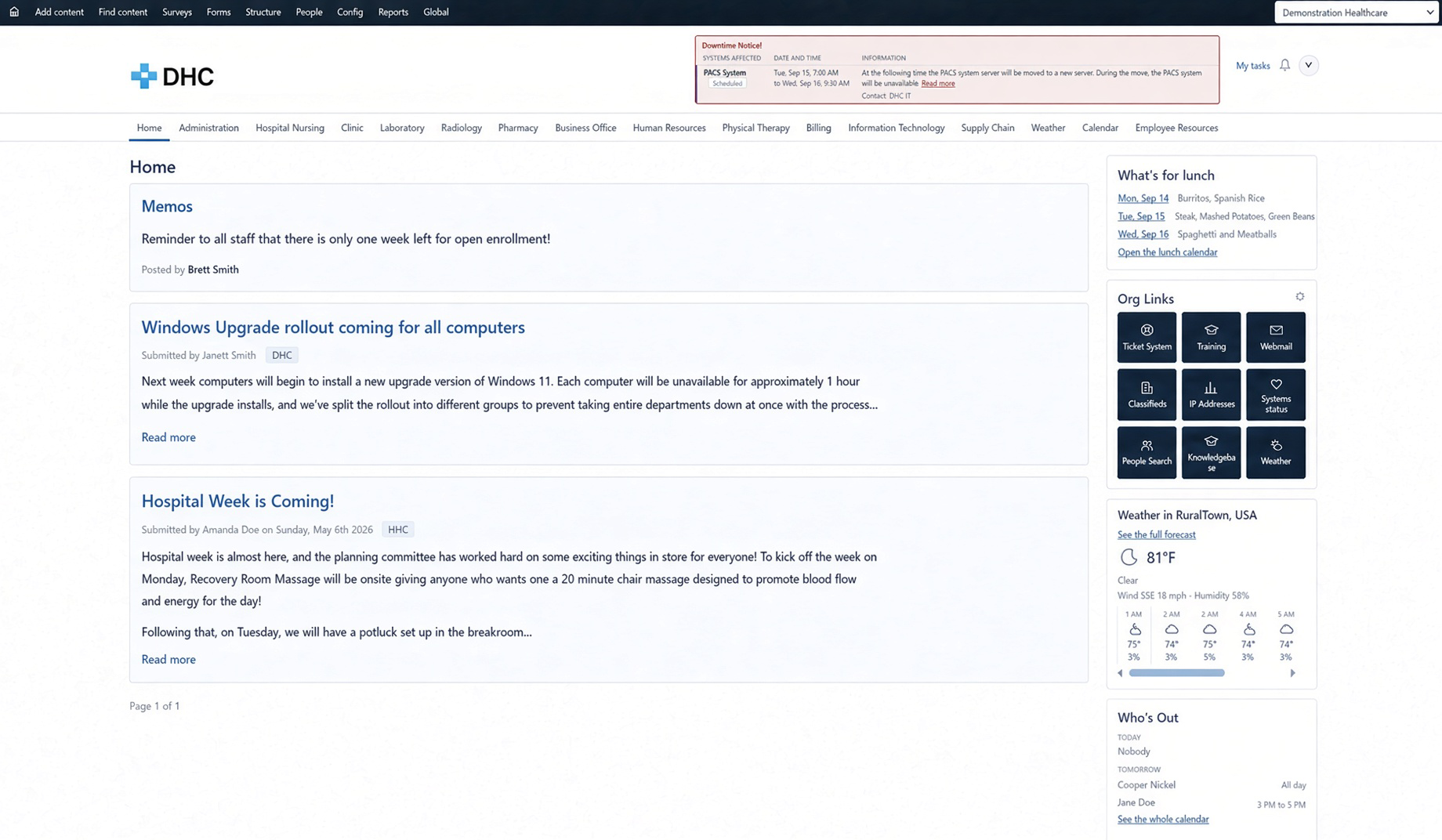
visuaFUSION RuralHub hospital intranet home page showing a downtime notice, memos, and the who is out board

The Hospital Intranet Built for Rural Health Care

Most rural hospitals have an intranet. Very few have one anybody opens. It was built on a general-purpose platform a few years ago by somebody who has since moved on. The phone list is a PDF that is two extensions out of date. The employee handbook lives in three places, and nobody is sure which copy is current. When the record system goes down, staff find out from the person at the next workstation, and the help desk finds out from forty phone calls.

The intranet was supposed to fix all of that. Instead it became one more thing that needs a developer to change and a budget line that grows every time somebody hires a nurse. The products that do the job well were built for corporations with a communications department, licensed per employee, and priced accordingly. A critical access hospital ends up choosing between an intranet that costs too much and an intranet that does too little.

visuaFUSION RuralHub is a hospital intranet built for rural health care organizations from the start. It gives your staff one place to open at the beginning of a shift: is anything down, who is out today, what is for lunch, where is the new visitor policy, what is the extension for Pharmacy. Anything urgent sits at the top of every page. News and memos run down the middle. The things people glance at sit in a column beside them. Staff open it because lunch is on it. Then they see the memo. That is the whole strategy, and it works because it matches how a small hospital actually runs.

RuralHub runs on what you already have. Staff sign in with the same account they use at the workstation. The employee directory reads from the same system that manages those accounts, so nobody creates users and nobody maintains a phone list. Files stay on the shares and libraries where they already live. Nothing is duplicated, and nothing has to be maintained twice.

It is useful on day one. A new organization starts with roles, menus, departments, an employee resources area, and a set of ready-made new employee surveys already in place. Each department that wants one gets its own page, arranged by that department's own manager by dragging blocks into place. No ticket to IT. No call to marketing. No developer.

Downtime is the moment an intranet earns its keep, and it is the moment most of them fail. With RuralHub, a downtime notice appears as a banner across the top of every page, ahead of everything else, and a systems status board shows whether the systems your staff depend on are working. When the record system goes down, every workstation in the building says so on the first click, staff know who is working on it, and the help desk phone stops ringing.

If your organization is a health system with several rural facilities, or a managed service provider serving several rural health care organizations, one installation of RuralHub serves all of them. Each facility gets its own home page, its own departments, its own people, and its own administrators, and none of them can see the others' content. Shared notices are posted once.

RuralHub is licensed to your organization and runs on your own server, so your data stays where you keep everything else. It is priced for a rural health care budget, and the price does not climb every time you hire. Request pricing and you will get a number, along with a straight answer about what it takes to get running. If it is not a fit, we will tell you that too.

Request pricing

Key benefits

Downtime notices and system status on every screen

Memos, news, and policies that reach the floor

Department pages your departments run themselves

Forms and surveys built for small teams

One installation serves every facility

Built and priced for rural health care organizations

Capabilities

Downtime
& Status

When something goes down, everybody knows

A downtime notice appears as a banner across the top of every page, ahead of everything else, color coded by how serious it is. It can say "we do not know yet" instead of guessing at an end time, and it takes itself down when the problem is resolved. Beside it, a systems status board shows whether the systems your staff depend on are working, names who is responsible for each one, and tells the truth about what it has not checked rather than showing green. Notices can be raised automatically from your monitoring platform, and the same board runs on a break room wall screen with no sign-in required.

 
Memos
& News

Communication that reaches the floor

An all-staff email reaches everybody's inbox and almost nobody's attention. RuralHub puts the right notice in the right place for the right amount of time. Memos carry an expiry date and leave on their own, so the parking lot closure and the pharmacy shortage stop cluttering the page when they stop being true. Announcements stay until somebody takes them down. Featured items pin to the top and stay put. Department notices reach that department; organization-wide notices reach everybody, and posting one is a separate permission. Publishing can be scheduled for the policy that takes effect on the first of the month, and your public website's news can appear on the intranet automatically.

 
Department
Pages

Department pages your departments run themselves

Nursing has material only Nursing uses. So do the clinic, long term care, providers, and administration. Each department that wants one gets its own page with its own memos, documents, forms, file libraries, links, calendar, and a list of who is out today. The department manager arranges the page by dragging blocks into place, with no ticket to IT and no call to marketing. Departments hold teams beneath them, and both appear on the menu automatically. Who can see a department page is simple to explain and simple to trust: the people in that department, your administrators, and anybody with read access across the organization. Nobody else.

 
Every Policy
Has an Owner

Policies with a name on them

An employee handbook nobody reviews is worse than one nobody wrote, because people follow it. Every policy, procedure, and resource in RuralHub carries a named owner and a review date, so an out-of-date document has somebody to tell. Every edit is kept as a revision with who changed it and when, so when a surveyor asks what the visitor policy said on a given date, there is an answer. Your organization can add its own fields to any kind of content, so a policy number or an approving committee becomes a real field rather than a habit somebody has to remember. Files stay on the shares and document libraries where they already live, and staff see exactly what they would see in File Explorer.

 
Forms
& Surveys

Forms and surveys built for a team of three

The incident report, the maintenance request, the time-off request: build them once and stop chasing them through email. Questions appear only when they apply, name and department fill in from the directory, forms can require a signature and route to an approver, and each form has its own inbox with its own permissions, so quality and facilities never see each other's submissions. Surveys solve the problem every small team has: below a minimum number of responses, a leader cannot open individual confidential answers at all, so a nurse on probation can answer honestly and still get a reply. Every organization starts with ready-made new employee surveys at the first week, thirty, sixty, and ninety days.

 
Zero User
Administration

A directory that keeps itself current

Nobody creates accounts in RuralHub. People arrive from your existing directory on a schedule, usually before their first shift, with their name, title, department, telephone number, and email already in place. Somebody who leaves is marked inactive rather than deleted, so anything they wrote still has an author. Access follows the groups your organization already maintains, so when somebody transfers from Med-Surg to the clinic, their department page and their permissions follow without anybody touching the intranet. Staff can even see which Microsoft licenses are assigned to them on their own profile, which answers "do I actually have Teams" without a help desk ticket.

 
Security
& Privacy

Security and privacy your staff can trust

Staff sign in with the same account they use at the workstation, and on a shared workstation an idle session returns to a neutral state so the next person does not inherit the last one. Restricted content is invisible rather than refused: somebody outside the audience gets the same answer as somebody asking for a page that does not exist, because a refusal would confirm the disciplinary policy exists. Administration can read everything and change nothing through a read-only role built for exactly that, and nothing can be hidden from your administrators or an auditor. Role changes, settings changes, publishing, and every cross-organization access are recorded for surveyors. Ordinary reading is deliberately not logged, so an employee can look up the employee assistance program without that lookup carrying their name.

 
1 Install
Every Facility

One installation. Every facility.

A health system with several critical access hospitals, or a managed service provider serving several rural health care organizations, runs one installation of RuralHub for all of them. Each organization gets its own home page, departments, people, branding, and administrators. Another organization's content never appears alongside yours: not on the home page, not in search, not in a count, and anyone crossing that line is told their access will be logged. Shared things are posted once, so a notice about the shared record system or the network between facilities reaches every home page from a single post. Configuration copies from one facility to the next, so four hospitals look and behave alike without being configured four times.

 
Priced for
Rural Health Care

Simple to run, and priced for the organization you actually are

RuralHub is administered by the people you already have. Features switch on and off from one page, menus fill themselves, and entries people cannot use are not shown to them. Scheduled work such as notice expiry, directory updates, and status checks runs inside the application with nothing to babysit. Upgrades are an installer package and a documented procedure that keeps your configuration and history. Your IT team also gets the operational pieces they are otherwise keeping in a spreadsheet, including built-in IP address management and integration with popular network monitoring and ticketing platforms. It is licensed to your organization, runs on your own server, and is priced for a rural health care budget. Not per employee. Not per module. A critical access hospital should not have to choose between an intranet staff will use and one it can afford, and with RuralHub it does not have to.

Looking for a new intranet, or have one nobody opens? Request pricing and get a number, along with a straight answer about what it takes to get running.

Request Pricing