3 DMARC Gaps Can Leave Your Health Care Email Domain More Exposed Than Your IT Team Realizes
Email is one of the critical attack surfaces rural health care organizations need to secure.
DMARC is a foundational piece of protecting your email domains.
DMARCMon makes monitoring it practical.
See who's sending as your domains, what's authenticating, what's failing, and where your team needs to look first without paying enterprise security prices.
Request Pricing And See DMARCMon
Email Is 1 Attack Surface Rural Health Care Can't Afford To Leave Half Secured
Rural health care organizations are being asked to defend themselves against increasingly sophisticated threats with budgets and IT teams that are already stretched thin.
And one of the most important places to start is also one of the most heavily used systems in your organization.
Email.
- It's where your employees communicate.
- Where vendors reach your team.
- Where administrators conduct business.
- Where countless third party platforms send messages using your domains.
And it's an attack surface bad actors know how to exploit.
That's why securing your email domain isn't some obscure technical checkbox.
It's foundational.
And one foundational piece of email domain security is DMARC.
DMARC stands for Domain-based Message Authentication, Reporting and Conformance. It lets domain owners define how receiving mail systems should handle messages claiming to come from their domains when SPF or DKIM authentication doesn't line up.
But publishing a DMARC record is only the beginning.
Because if nobody is monitoring what DMARC is reporting back, you're missing the part that tells you what's actually happening.
Those are the questions monitoring helps answer.
And we've seen why this matters firsthand.
When running rural health care organizations through our email domain security score checker, we've seen scores as low as 3 out of 10.
That score comes from our Email Domain Health Check, which is free and open to anyone. Run your own domain through it if you want to see where you land.
Not because rural health care IT teams don't care about security.
Because they're being asked to defend more systems against more complex threats with fewer resources to do it.
That's The Gap DMARCMon Was Built To Help Close.
DMARCMon gives rural health care IT teams an affordable way to monitor DMARC and understand what's happening across their email domains without paying for another oversized enterprise security platform.
Because when email is one of the attack surfaces you need to secure, DMARC shouldn't be the thing sitting half finished because monitoring it was too expensive.
Your Microsoft 365 Mail Is Only 1 Part Of The Story
Your primary mail system might be configured correctly.
Great.
But what about the billing platform?
- The patient notification system?
- The recruiting tool?
- The marketing platform someone connected three years ago?
- The vendor sending email on behalf of your domain?
- The old service nobody remembered to tell IT about?
- Or the sending source nobody on your team recognizes at all?
That's the problem.
Email rarely comes from one neat, perfectly documented system anymore.
And simply publishing DMARC doesn't magically tell your IT manager what deserves attention.
That's where monitoring earns its keep. Inbound filtering like our email phishing and data protection service tells you what arrived. DMARC monitoring tells you what left, and what somebody else sent while wearing your domain.
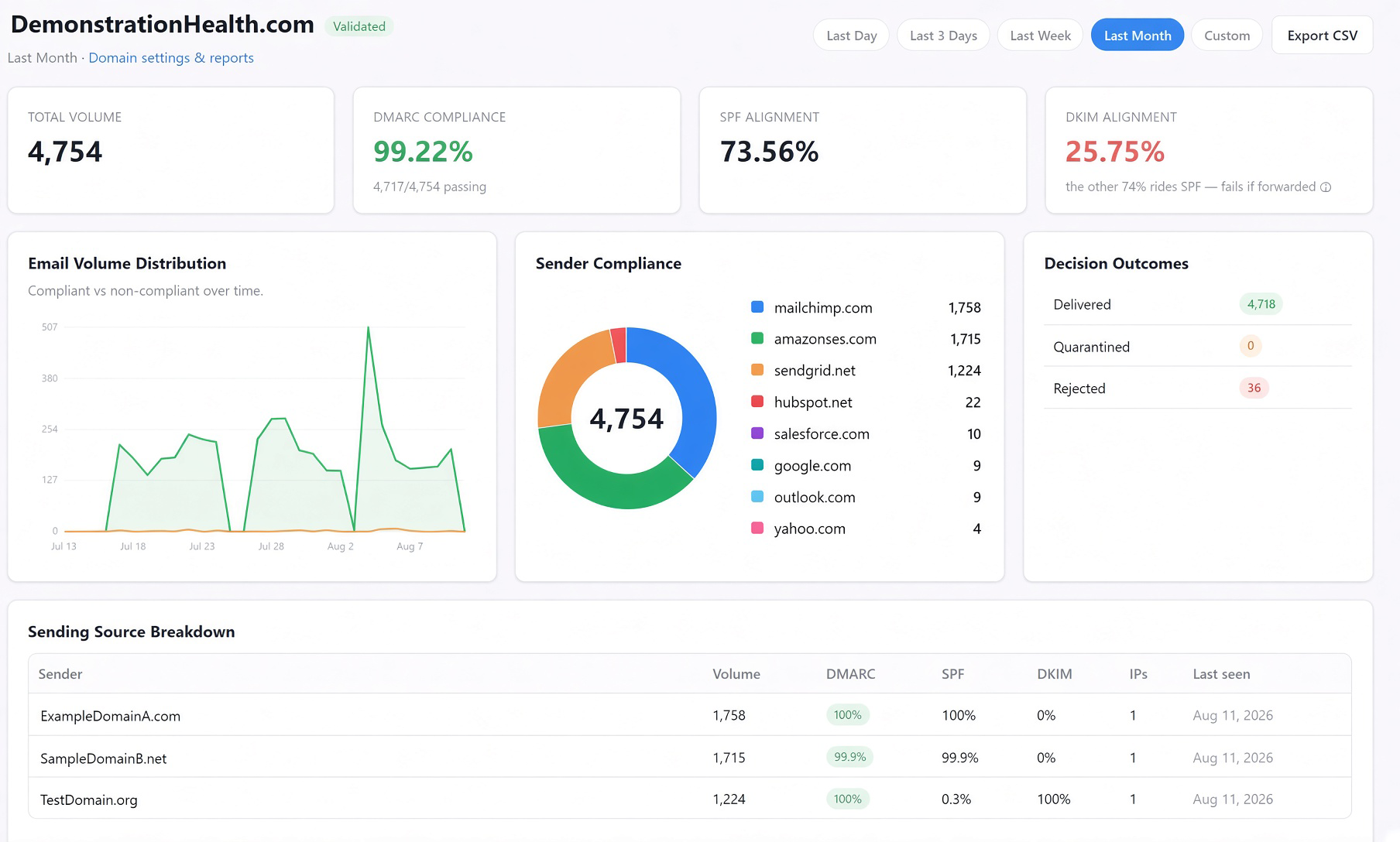
DMARCMon ingests aggregate DMARC reports and turns them into something your team can actually use.
You can see which sources are sending as your domains.
Which mail is authenticating.
Where SPF or DKIM alignment is failing.
Which domains need attention.
Which sending paths have appeared.
And when each source was last seen.
Because your IT team shouldn't have to dig through raw XML just to answer one simple question.
Who's Sending As Us And Is It Authenticating Correctly?
DMARCMon Turns Thousands Of DMARC Signals Into 1 Place To Look First
DMARCMon was built to make DMARC monitoring practical for organizations that don't have endless people, time, or budget.
Instead of burying problems inside one giant average, DMARCMon surfaces the domains that need attention.
You see the problems that deserve investigation first.
Then you can drill directly into the records behind the problem.
No guessing which domain pulled down an average.
No manually parsing XML reports.
No wondering whether you're looking at current traffic or something that hasn't been seen in months.
Just clearer visibility into what is actually happening across your email domains.
10 Signals Hiding Inside Your DMARC Reports That Your Team Can Finally Put To Work
Inside DMARCMon you'll discover
1 Convincing Spoofed Email Can Turn Into A Much Bigger Problem Than 1 Stolen Password
This is where email attacks can get ugly fast.
An employee receives an email that appears to come from someone they trust.
They've been trained to check the sender.
They do.
The domain looks right.
So they trust it.
They click.
They land on a convincing sign in page.
They enter their credentials.
And now the problem may no longer be a spoofed email.
Now The Attacker May Have A Real Account
And that's an entirely different level of trust.
With access to a legitimate account, an attacker may be able to study how people communicate, identify valuable relationships, and send convincing messages from an account employees already know.
Now imagine the next email doesn't merely look like it came from someone inside your organization.
It actually came from their compromised account.
And the person receiving it has considerably fewer reasons to question what they're seeing.
One compromised employee can create an opportunity to target another.
Then another.
Potentially even someone with greater access or authority.
This is why employee training alone cannot be the entire strategy.
You can teach people to inspect an email.
You can teach them to recognize suspicious links.
You can tell them to check who sent it.
But if one of the signals you're asking them to trust is your domain, you need to do everything practical to make that signal worthy of their trust.
That's Why Email Domain Security Needs To Start At The Foundation
DMARC is an important part of that foundation.
Properly implemented alongside SPF and DKIM, DMARC helps receiving mail systems determine whether messages claiming to come from your domain authenticate and align as expected, and what should happen when they don't.
There's just one problem.
DMARC Is Easy To Talk About And Painful To Manage Blind
Publishing a record is one thing.
Actually getting DMARC right is another.
Because suddenly you're trying to answer questions like
Raw DMARC reports weren't designed to make an overworked rural health care IT manager's Tuesday afternoon easier.
They're XML.
They're noisy.
They arrive from multiple mailbox providers.
And the information that matters can be buried inside them.
That's the hard part DMARCMon was built to make manageable.
DMARCMon collects those aggregate reports and turns them into human readable visibility.
- See who's sending as your domains.
- See what's authenticating.
- See what's failing.
- See SPF and DKIM alignment.
- See which sending sources are active.
- See which domains need attention first.
Then drill into the records behind the problem.
Because rural health care organizations shouldn't have to choose between ignoring DMARC data and paying enterprise prices just to understand it.
That's Why We Built DMARCMon
To take one of the more difficult pieces of email domain security and make it practical for the IT teams that need it most.
Because if you're teaching employees to trust your domain, your domain needs to deserve that trust.
Rural Health Care Shouldn't Need A Fortune 500 Security Budget To Get DMARC Visibility
This is where the cybersecurity market gets frustrating.
A rural health care organization may have fewer people, fewer resources, and a dramatically smaller technology budget than a major health system.
But attackers don't give you a discount because your budget is smaller.
Your domains still need protecting.
Your vendors still send email.
Your authentication still needs monitoring.
Your IT team still needs visibility.
Yet too many security products arrive carrying enterprise sized complexity and enterprise sized pricing.
DMARCMon takes a different approach.
DMARCMon Won't Stop 100 Percent Of Cyberattacks And We Won't Pretend It Will
It isn't supposed to.
DMARC is one piece of a much larger cybersecurity puzzle.
You still need endpoint protection.
Identity security.
Backups.
User education.
Patching.
Network security.
And the rest of your security stack.
BUT DMARCMon gives your team visibility into an important piece of your email domain security that's dangerously easy to overlook.
It helps you understand who is sending as your domains and whether that mail is authenticating correctly.
That's the job.
And we'd rather do that job well than pretend one dashboard magically solves cybersecurity.
Your Team Doesn't Need 47 More Charts It Needs To Know What Deserves Attention
DMARCMon gives each organization a scoped view of its own environment.
The overview surfaces domains that need attention worst first based on signals including active rejects or quarantines, low compliance, unvalidated domains, and silent domains.
From there, your team can drill into the underlying records.
See when reports occurred.
See when sending sources were last observed.
Export domain data when needed.
And understand whether you're looking at a current issue or ancient traffic.
For MSPs serving rural health care organizations, DMARCMon goes further.
Each client remains separated within a strict tenant hierarchy.
No giant cross tenant blend pretending every client's security posture can be understood from one average.
Each organization remains its own environment.
1 DNS Check Helps Make Sure Nobody Can Quietly Monitor A Domain They Don't Own
DMARC data can reveal meaningful information about an organization's email infrastructure.
So DMARCMon doesn't let someone simply type in any domain they feel like monitoring.
Domains are globally unique inside the platform and tied to an owning organization.
Ownership is validated through DNS using a generated TXT token.
That means the platform is designed to monitor domains belonging to the organizations actually authorized to use it.
Because visibility shouldn't come at the expense of control.
3 Levels Of Tenant Isolation Keep The Right Data In Front Of The Right People
DMARCMon uses a server enforced role hierarchy across
Organizations see their own data.
MSPs can manage their client portfolio.
Global administrators can manage the platform.
Sensitive actions are audit logged.
Organizations or MSPs can be suspended when necessary.
Microsoft single sign on is supported.
Auto provisioning is restricted to validated registered domains.
Secrets are encrypted at rest using AES 256 GCM.
Passwords are protected with bcrypt.
State changes use CSRF protection.
Database interactions use prepared statements.
The boring security details matter.
Especially when the product itself is supposed to help improve security visibility.
Is DMARC Monitoring Required Under HIPAA? Here's The Straight Answer.
No. The HIPAA Security Rule does not name DMARC anywhere in its text. Anyone telling you otherwise is overstating the regulation.
But that's the wrong question.
The Security Rule is deliberately technology neutral. It tells you what outcomes you owe, then leaves the implementation to your own risk analysis. A few places where email domain authentication tends to land:
The HHS 405(d) program's Health Industry Cybersecurity Practices guidance points to email protection as a baseline practice for health care organizations of every size. Domain authentication sits squarely inside that.
So DMARC monitoring is not a checkbox on a compliance form.
It is evidence. When a risk assessor, a cyber insurance underwriter, or an auditor asks how you know your domains are not being abused, "we monitor our DMARC aggregate reports and here is the record" is a materially better answer than a shrug.
Pair it with HIPAA compliant email encryption on the outbound side and you have covered a lot of ground on the email attack surface for very little money.
DMARCMon Isn't Trying To Be 47 Cybersecurity Products Stuffed Into 1 Login
That's intentional.
If you're looking for a massive enterprise security suite containing hundreds of modules, DMARCMon probably isn't for you.
If you have a huge SOC with analysts who enjoy manually parsing raw DMARC reports, you may not need us either.
And if you're looking for a product that promises to magically stop every cyberattack, definitely don't buy DMARCMon.
That's not what we're selling.
But if you're responsible for protecting a rural health care organization and need a practical way to understand what's happening across your email domains without adding another oversized enterprise contract, we should talk.
Especially if your reality looks something like this
- Your IT team is small.
- Your security responsibilities aren't.
- Your budget is under pressure.
- Your email environment has accumulated vendors and sending services over the years.
- And you know there are security improvements you should be making, but you need to know where to focus first.
That's exactly the problem DMARCMon was built to help solve.
Manage 10 Health Care Clients Without Turning Their DMARC Data Into 1 Giant Mess
DMARCMon was also built for MSPs serving organizations that need DMARC monitoring but may never purchase, deploy, and manage an enterprise platform themselves.
MSPs get portfolio visibility while each client remains properly scoped.
Organizations retain their own dashboards.
Plans and quotas can be managed across organizations.
Domain ownership is validated.
Access is controlled according to role.
And client data doesn't need to be flattened into one giant cross tenant average.
From broad visibility to the specific problem without losing tenant boundaries along the way.
DMARC Monitoring Questions Rural Health Care IT Teams Actually Ask Us
What is DMARC monitoring, in plain terms?
When you publish a DMARC record with a reporting address, mail providers like Microsoft, Google, and Yahoo start sending you daily XML files describing every message they saw claiming to be from your domain. Those are called aggregate reports, or RUA reports.
DMARC monitoring is the practice of actually reading them. DMARCMon ingests those reports and turns them into a view your team can work from instead of a folder of unopened XML attachments.
What is the difference between p=none, p=quarantine, and p=reject?
Those are the three DMARC policies you can publish. With p=none, receiving servers deliver failing mail normally and just report on it. With p=quarantine, they route it to junk. With p=reject, they refuse it outright.
Most organizations should sit at p=none until monitoring shows every legitimate sender is aligned, then step up. Moving to p=reject without monitoring first is how a hospital accidentally blocks its own patient reminder system. This is the single biggest reason to monitor before you enforce.
Does DMARCMon replace SPF and DKIM?
No. SPF and DKIM are the underlying authentication mechanisms and you still need both configured correctly. DMARC sits on top of them and defines what should happen when they fail or fall out of alignment. DMARCMon shows you where that alignment is breaking down and which sender is responsible.
We run Microsoft 365. Does that work?
Yes. DMARC reporting is a DNS and mail provider function, not something specific to your mail platform, so Microsoft 365, Google Workspace, and on-premises Exchange all work the same way. DMARCMon also supports Microsoft single sign on for user access, with auto provisioning restricted to domains that have been validated.
What do we have to change in DNS to get started?
Two records. A TXT record proving you own the domain, using a token DMARCMon generates for you, and a DMARC record pointing its reporting address at DMARCMon. If you already publish DMARC, that second one is usually an edit rather than a new record.
Can somebody monitor a domain that isn't theirs?
Not deliberately. Domains are globally unique inside the platform and tied to one owning organization, and ownership is validated through a DNS TXT token before reporting data is associated with an account.
Our IT is outsourced. Can our MSP run this for us?
Yes. DMARCMon has a three level role hierarchy of Global Admin, MSP, and Organization, enforced on the server side. An MSP sees its whole client portfolio, each client organization keeps its own scoped dashboard, and one client's data is never blended into another's.
Do DMARC reports contain PHI?
Aggregate reports describe sending infrastructure rather than message content. They carry sending IP addresses, authentication results, volumes, and dispositions. They do not carry message bodies or attachments. Talk to us about your specific reporting setup and we will walk through what DMARCMon does and does not hold.
How much does DMARCMon cost?
TODO: pricing model and starting price go here. This question gets searched more than any other and an answer that says "contact us" wastes the position.
How long is report data retained?
TODO: retention window by plan goes here. Auditors and insurers ask this one, so it is worth answering on the page.
Not Ready To Talk To Anyone? Score Your Own Domain First.
Before you evaluate a monitoring platform, it's fair to want to know whether you have a problem worth solving.
Our Email Domain Health Check reads your public DNS and scores your SPF, DKIM, and DMARC configuration out of 10, framed around HIPAA email security expectations. It takes about as long as this page took to load.
If you come back below 10, that score is the argument for monitoring.
If you come back at 10 out of 10, good. Now the question becomes how you stay there after somebody adds a new billing vendor next quarter. A scan tells you how your DNS is configured today. DMARC monitoring tells you what is actually sending as you, every day after that.
You Don't Need 1 More Dashboard You Need To Know Which Domain Needs Attention
The worst time to discover a gap in your email domain security is after someone else has already taken an interest in it.
And the answer doesn't have to be another enormous cybersecurity platform.
See what focused DMARC monitoring could look like for your rural health care organization.
We'll show you how DMARCMon works.
We'll talk through your environment.
We'll explain what the platform can and cannot do.
And we'll give you straightforward pricing so you can decide whether it deserves a place in your security stack.
No pretending you have an unlimited cybersecurity budget.
No burying you in DMARC jargon.
No claiming one product solves every security problem.
Just a clearer picture of who's sending as your domains, whether that mail is authenticating correctly, and where your team may need to look next.
P.S. Attackers don't need every door to be open. They need to find the one everyone else overlooked. We've seen rural health care organizations score as low as 3 out of 10 on email domain security. If you're wondering what your missing points could be telling you, let's take a look.
Request Pricing And See DMARCMonMore On Email Security For Rural Health Care
DMARC monitoring is one layer. Here is the rest of what we do around email.

DMARCMon is built and operated by visuaFUSION Systems Solutions.